



Core Web Vitals are three measurements Google uses to judge a page’s real-world user experience: how fast it loads, how quickly it responds, and how stable it stays while loading.
Most explanations stop at the definitions. That’s the easy part. This guide pairs each metric with what usually breaks it and how to fix it.
The Three Metrics at a Glance
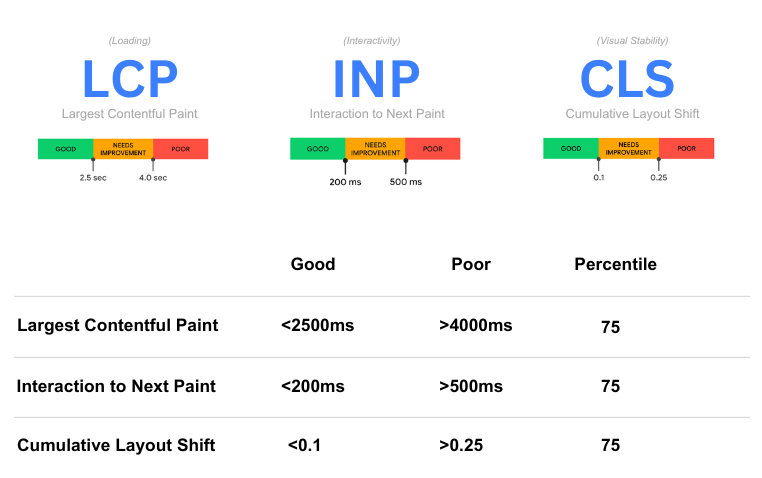
| Metric | What it measures | Good | Poor |
|---|---|---|---|
| LCP (Largest Contentful Paint) | Loading: how long until the main content appears | 2.5s or less | Over 4s |
| INP (Interaction to Next Paint) | Responsiveness: how fast the page reacts to clicks, taps, and key presses | 200ms or less | Over 500ms |
| CLS (Cumulative Layout Shift) | Visual stability: how much content jumps around unexpectedly | 0.1 or less | Over 0.25 |
Google assesses these at the 75th percentile of real visits. To pass, at least 75% of page views need to hit the “good” threshold on all three.
First: Field Data vs. Lab Data
This trips up almost everyone. There are two kinds of performance data:
- Field data comes from real Chrome users visiting your site, collected in the Chrome User Experience Report (CrUX) over a rolling 28-day window. This is what Google uses.
- Lab data comes from a simulated test, like Lighthouse, run on one device under set conditions. Useful for debugging, but it isn’t what Google evaluates.
Search Console’s Core Web Vitals report and the real-user section at the top of PageSpeed Insights show field data. Start there. A perfect lab score means nothing if your real visitors are having a slow experience.
LCP: Loading
LCP marks when the largest visible element, usually a hero image, featured image, or main headline, finishes rendering.
What Usually Breaks It
- A slow server response, so everything starts late
- A large, uncompressed hero image
- The main image being lazy-loaded, which delays exactly the thing that should load first
- Render-blocking CSS and JavaScript in the page head
How to Fix It
- Never lazy-load the LCP image. Lazy loading is great for images further down the page, and terrible for the main one.
- Prioritize it. Add
fetchpriority="high"to the LCP image so the browser fetches it first. - Serve it efficiently. Modern formats like WebP or AVIF, sized for the screen, compressed properly.
- Speed up the server. Good hosting, page caching, and a CDN reduce the time before anything starts loading at all. For a deeper walkthrough, see how to fix a slow LCP on a content site.
INP: Responsiveness
INP measures the delay between an interaction and the screen visibly updating. It’s the metric most sites fail without knowing it, because standard lab tests don’t measure it.
What Usually Breaks It
- Heavy JavaScript running in long, uninterrupted tasks
- Third-party scripts like chat widgets, ad tags, and trackers competing for the main thread
- Very large pages with thousands of elements to update
How to Fix It
Break up long tasks, cut unnecessary scripts, and show visual feedback immediately when someone interacts. INP deserves its own walkthrough, so I cover it in full in how to diagnose and fix INP.
CLS: Visual Stability
CLS measures unexpected movement. You go to tap a link, an ad loads above it, and you tap the wrong thing. That’s layout shift.
What Usually Breaks It
- Images and videos without set dimensions
- Ads, embeds, and iframes that load in without reserved space
- Web fonts swapping in and changing the size of text
- Banners or notices injected at the top of the page after it loads
How to Fix It
- Always set width and height on images and videos, so the browser reserves the right space.
- Reserve space for ads and embeds with a fixed-size container, even before they load.
- Tame font swaps by preloading key fonts and using fallback fonts with similar dimensions.
- Don’t insert content above existing content unless the user triggered it. Each cause, with its fix, is covered in layout shift caused by ads, fonts, and embeds.
The Side Nobody Mentions: Passing Isn’t the Finish Line
Google has been clear that good Core Web Vitals don’t guarantee high rankings. Relevance and quality come first. Passing all three won’t lift a weak page past a stronger one.
So why bother? Because the metrics were designed around what frustrates real people. Slow loads, laggy buttons, and jumping layouts cost you visitors whether or not they cost you rankings. And when two pages are otherwise close, experience can be the tiebreaker.
Treat Core Web Vitals as a floor to clear, not a trophy to chase. Once you pass, a faster score rarely moves rankings. Your next hour is usually better spent on content.
How to Prioritize Fixes
- Open Search Console’s Core Web Vitals report and look at mobile first. Mobile usually fails first.
- Group failing URLs by template. Fixing a template fixes every page that uses it.
- Start with the metric failing on the most important templates.
- After shipping fixes, use “Validate fix” and allow about four weeks for field data to catch up.
Where It Fits
Core Web Vitals are one part of where UX and SEO actually overlap, and performance is layer five of my technical SEO audit framework.