



Interaction to Next Paint (INP) is the Core Web Vital most sites fail without realizing why. It replaced First Input Delay in March 2024, and it’s far stricter. FID only measured the delay before the first interaction started. INP measures how long it takes the page to visibly respond to interactions throughout the whole visit.
In plain terms: you tap a button, and nothing happens for half a second. That lag is what INP captures.
What Good INP Looks Like
Google’s thresholds, measured at the 75th percentile of real visits:
- Good: 200 milliseconds or less
- Needs improvement: between 200 and 500 milliseconds
- Poor: more than 500 milliseconds
INP counts clicks, taps, and key presses. Scrolling and hovering don’t count. And it reports one of the slowest interactions on the page, not the average, which is why a single sluggish menu or filter can sink your score.
Why Your Lab Tests Look Fine
Here’s the trap. The standard Lighthouse page load test, the one behind PageSpeed Insights’ lab score, doesn’t measure INP. It loads your page but never clicks around it like a real person. The closest lab proxy it reports is Total Blocking Time (TBT).
So you can score 95 in Lighthouse and still fail INP in the real world. Always diagnose INP from field data: what real visitors experience.
Step 1: Find Where INP Is Failing
- Search Console’s Core Web Vitals report groups failing URLs by similar page type. Start here to see which templates are affected.
- PageSpeed Insights, in the top section labeled with real-user data, shows INP for a specific URL or origin if there’s enough traffic.
- Real user monitoring, through a tool or Google’s web-vitals JavaScript library, tells you which exact element and interaction caused the slow response. This is the most useful data you can get.
Step 2: Reproduce the Slow Interaction
Open the page in Chrome, open DevTools, and go to the Performance panel. It shows live INP as you interact with the page.
Now click the things real users click: menus, filters, “add to cart,” accordions, form fields. When an interaction is slow, record it and look for long tasks, the blocks of JavaScript marked with red corners that run for more than 50 milliseconds.
Turn on CPU throttling while you test. Your laptop is much faster than the average visitor’s phone, and INP problems often only show up on slower devices.
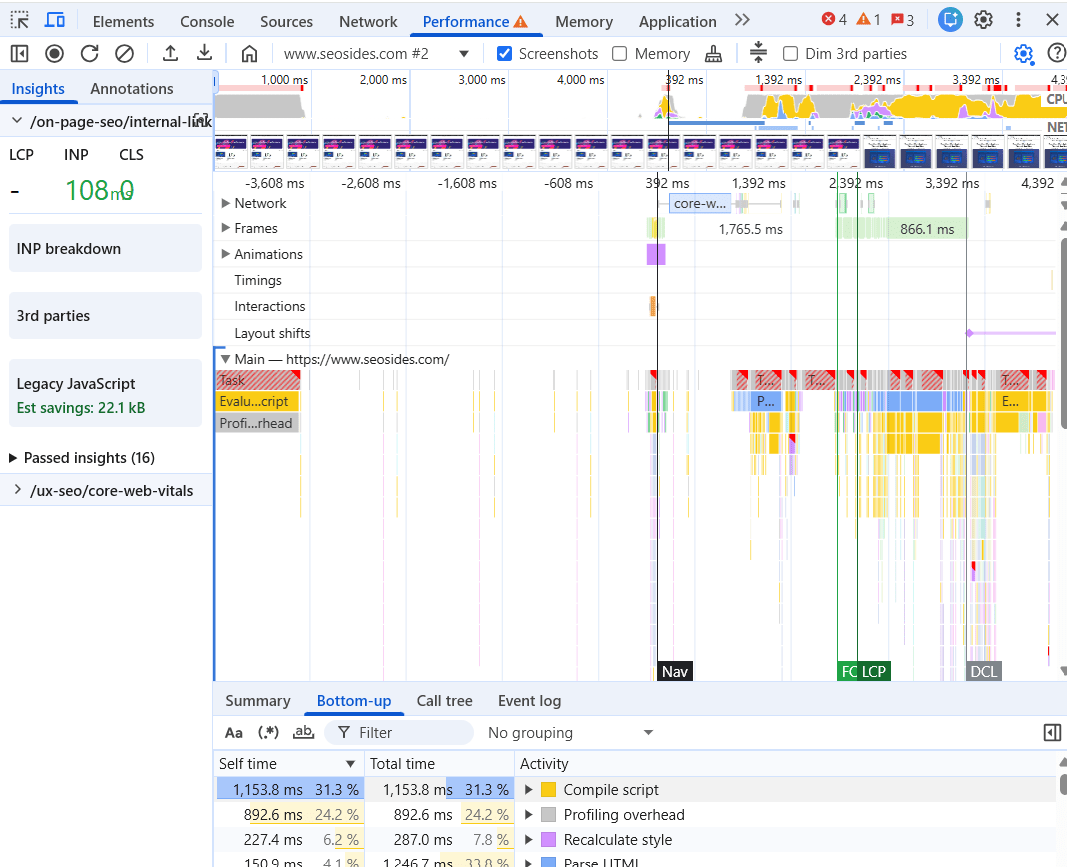
Step 3: Understand the Three Parts of a Slow Interaction
Every interaction has three phases, and each one can be the bottleneck:
- Input delay. The browser is busy with something else when the user clicks, so it can’t respond yet. Usually caused by other scripts running on the main thread.
- Processing time. Your event handler code itself takes too long to run.
- Presentation delay. The code has finished, but the browser takes too long to update the screen, often because of a huge DOM or expensive layout work.
Knowing which phase is slow tells you where to fix.
Step 4: Fix It
Break Up Long Tasks
The single most effective fix. If a click triggers 300 milliseconds of JavaScript in one block, the screen can’t update until it finishes. Split the work up and yield to the main thread between chunks, so the browser can paint a response first. Modern Chrome supports scheduler.yield() for exactly this, with setTimeout as a fallback in other browsers.
Show Feedback Immediately
Update the interface first, then do the heavy work. If a filter button changes color the instant it’s tapped, then loads results, the interaction feels fast and measures fast.
Cut Third-Party Scripts
Chat widgets, heatmaps, ad scripts, and tag managers loaded with dozens of tags all compete for the main thread. Audit what’s running and remove anything you don’t use. Delay what’s left until after the page becomes interactive. Here’s how to audit third-party scripts slowing your site.
Shrink the DOM
Pages with thousands of elements take longer to update after every interaction. Mega menus, sprawling footers, and page builder layouts nested ten levels deep are frequent offenders.
The Side Nobody Mentions: WordPress Makes This Harder
On WordPress, INP problems rarely come from one bad line of code. They come from accumulation. A page builder, a slider plugin, a popup plugin, a social sharing plugin, and a chat widget each add their own JavaScript, and each one looks harmless on its own.
Caching plugins don’t fix this. Caching speeds up how fast the page arrives, not how fast it responds once it’s there. The fix is usually subtraction: fewer plugins, lighter themes, and less JavaScript overall.
How Long Until Search Console Updates?
Field data is collected over a rolling 28-day window. After you ship fixes, expect about four weeks before the Core Web Vitals report fully reflects them. Use “Validate fix” in the report to track progress, and keep watching your own real user monitoring data in the meantime for faster feedback.
Where It Fits
INP is one piece of where performance and experience meet. For the bigger picture, see where UX and SEO actually overlap, and for where performance sits in a full site review, see layer five of my technical SEO audit framework.